EPFO Login Portal Employer, Member Passbook & Epfo UAN Login
Do you want to check your Provident Fund (PF) details? Or are you an employer who wants to manage your employees’ PF? If so, you’re in the right place. This article will answer every small and big question related to the EPFO epfindia.gov.in.
We’ll guide you step-by-step on how to log in to the EPFO Portal as an employee, employer, or member. It includes how to view your EPFO passbook, how to log in with your UAN, what to do if you forget your password, and more. So be sure to read the article till the end.
Note: pfguide.in is an independent informational website and is not affiliated with EPFO or any government organization. For official services, visit epfindia.gov.in.
What is EPFO Login Portal?
The Employees’ Provident Fund Organisation (EPFO) is a statutory body under the Government of India that manages the Provident Fund (PF) and other social security schemes for salaried employees. It helps employees build long-term savings by depositing a portion of their salary into a PF account.
The EPFO Login Portal (epfindia.gov.in) is the official online platform that allows employees and employers to access PF services digitally. Through this portal, users can check PF balance, view passbooks, update KYC details, submit claims, and track request status—without visiting an EPFO office.
What is EPFO Login Portal?
- You can check your PF balance online.
- You can download your EPFO passbook.
- You can update your KYC details (Aadhaar, PAN, Bank).
- You can submit an online transfer claim (Form 13).
- You can submit a withdrawal claim (Form 19, 31).
Pro Tip: Always use the official website unifiedportal-mem.epfindia.gov.in to stay safe and avoid phishing scams.
What You Need Before EPFO Login
Before logging in, make sure you have the following:
- UAN Number: Your Universal Account Number.
- Password: The password of your EPFO portal account.
- Registered Mobile Number: The mobile number where you will receive the OTP.
- Captcha Code: The code shown in the image during Epfo login.
Member EPFO Login – Step-by-Step
If you are an employee, you need to log in through the EPFO Member Login. The process is very simple.
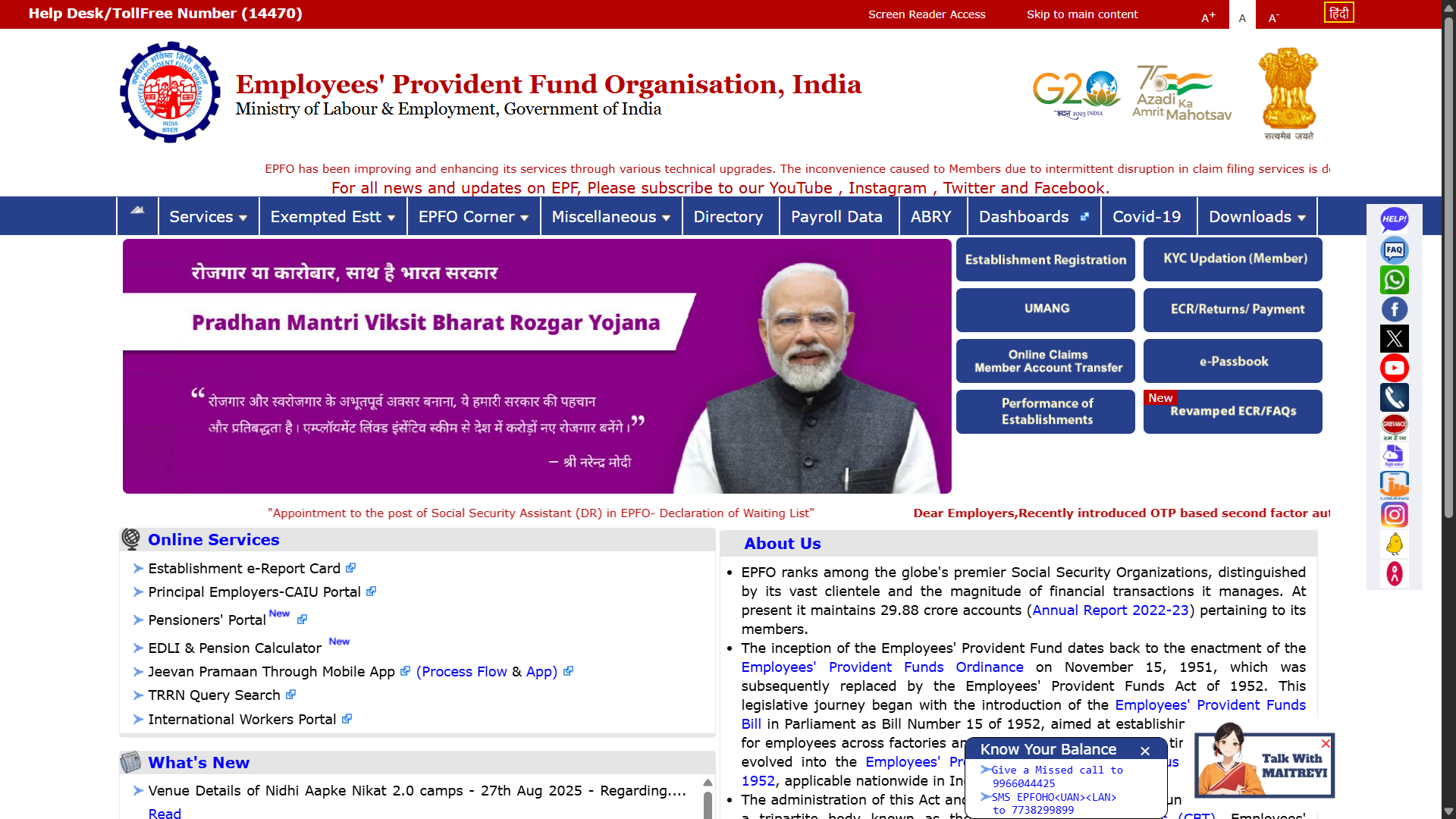
Step 1: Visit the Official Website
First, go to the EPFO official website.
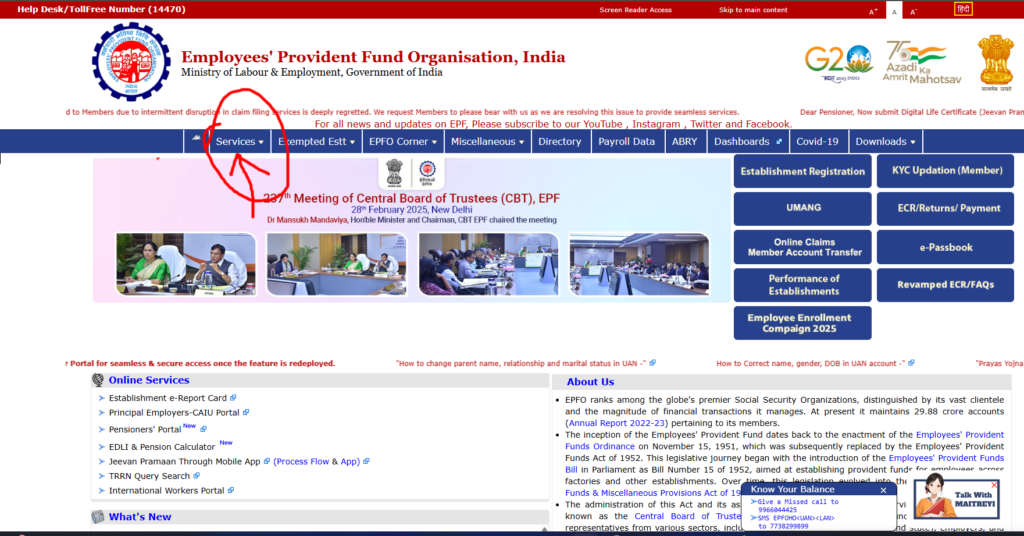
Step 2: Click on “Our Services”
On the homepage, you will find the “Our Services” section. Click on it.
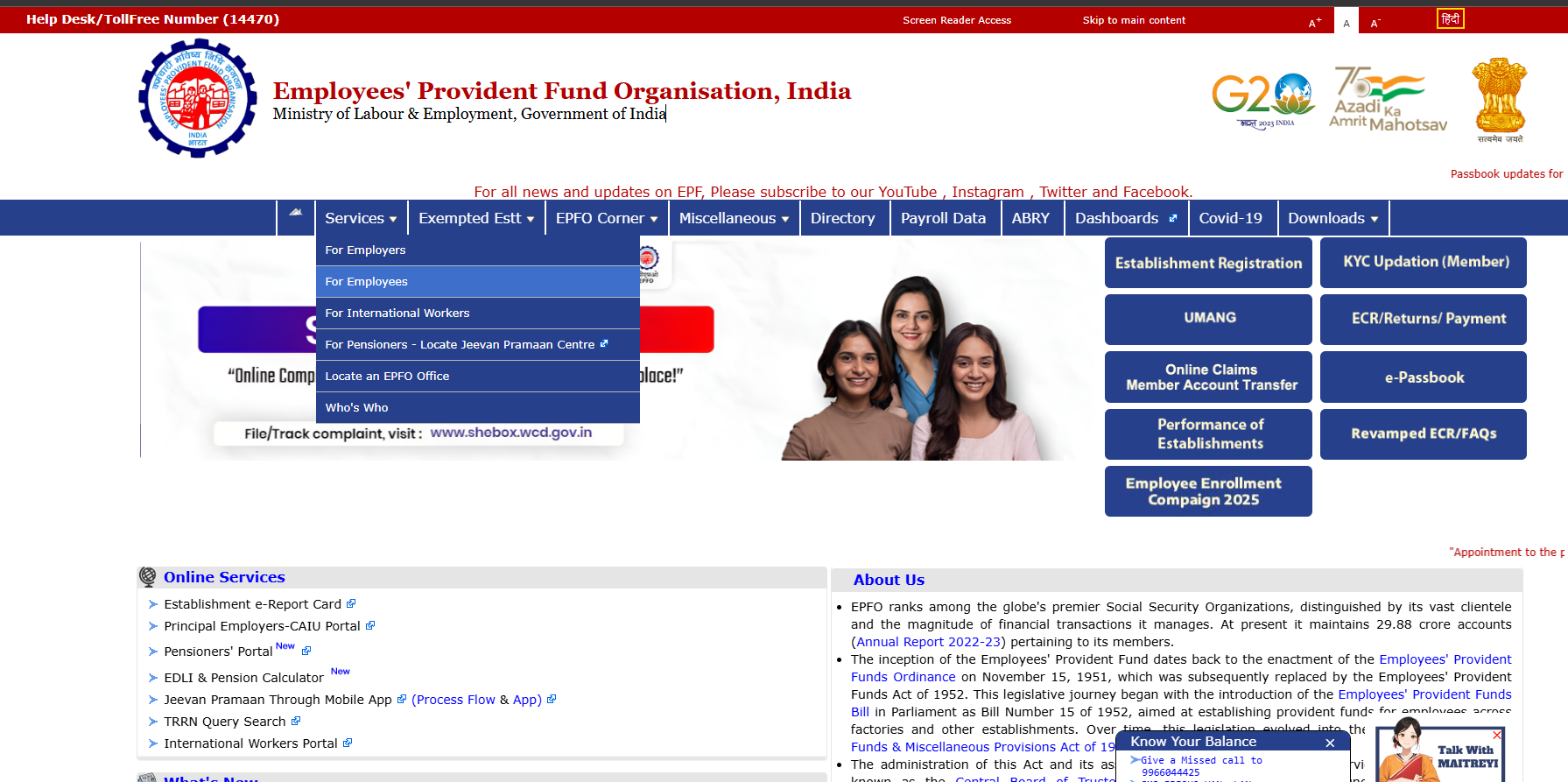
Step 3: Select “For Employees”
From the drop-down menu under “Our Services,” click on “For Employees.”
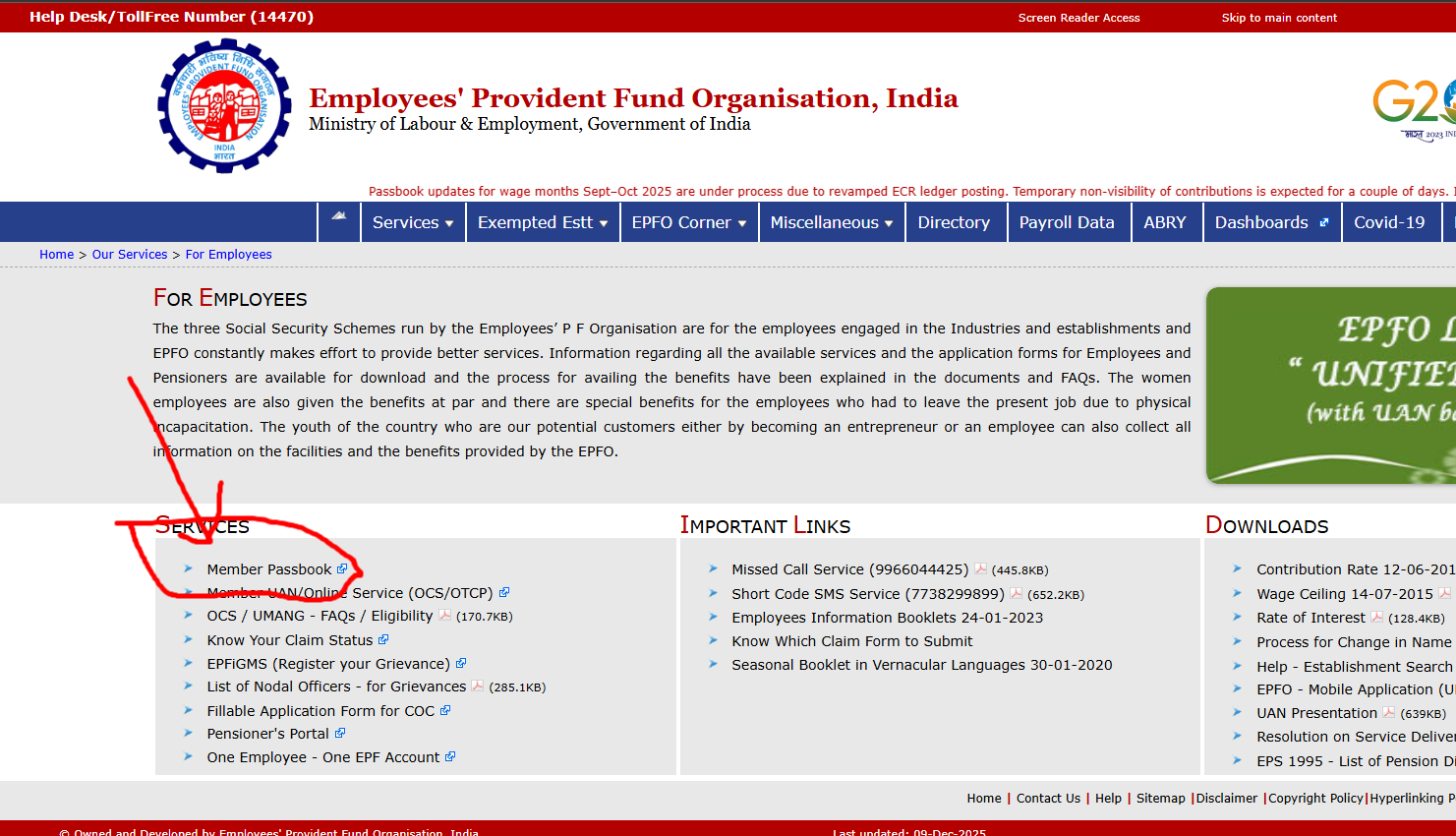
Step 4: Click on “Member Passbook”
A new page will appear, where you will see the link “Member Passbook.” Click on it. This will take you to the EPFO Member Home page.
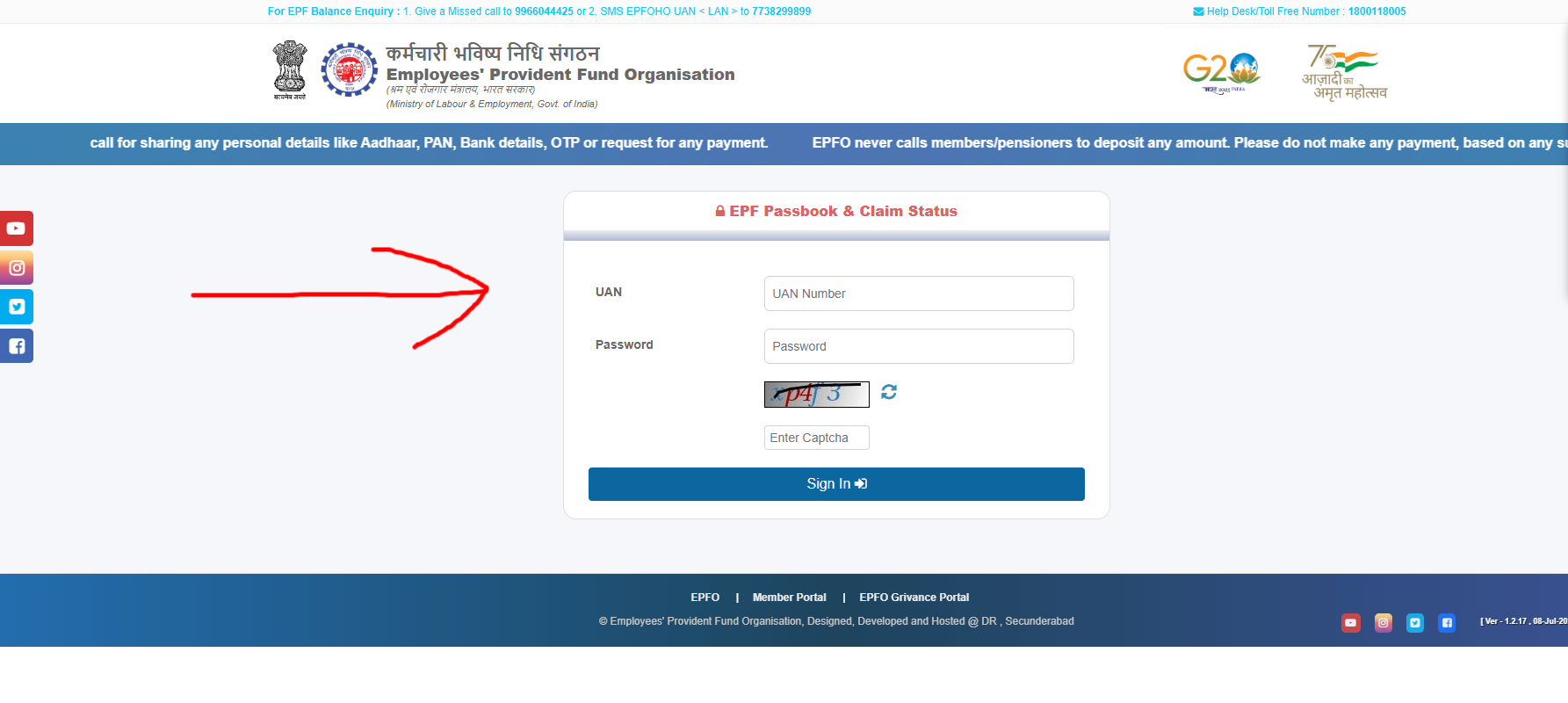
Step 5: Enter Your Login Credentials
On the Epfo login page, fill in the following details:
- UAN: Enter your 12-digit UAN number.
- Password: Type your password.
- Captcha: Enter the code shown in the image.
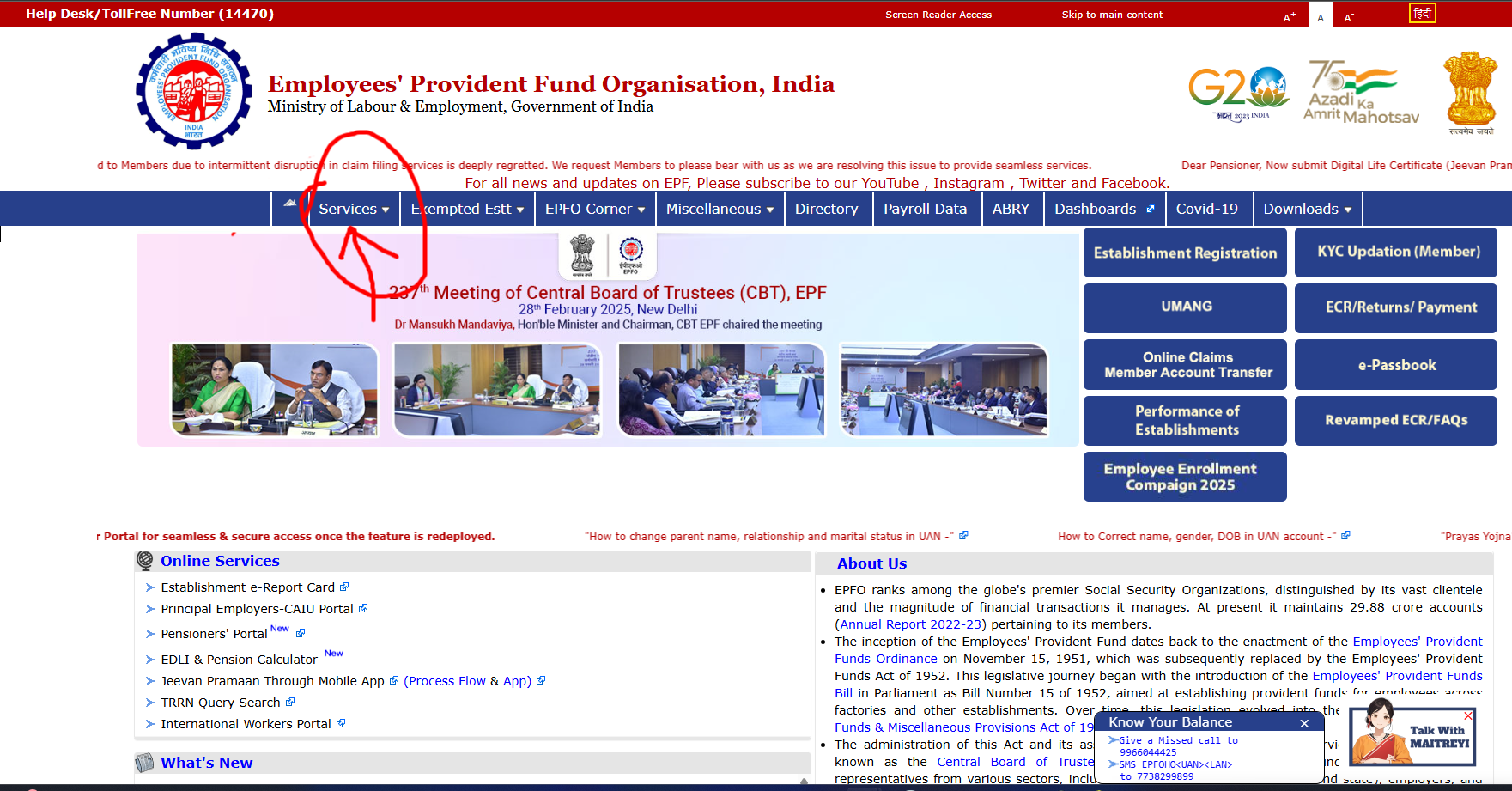
- Go to the “Our Services” section on the homepage.
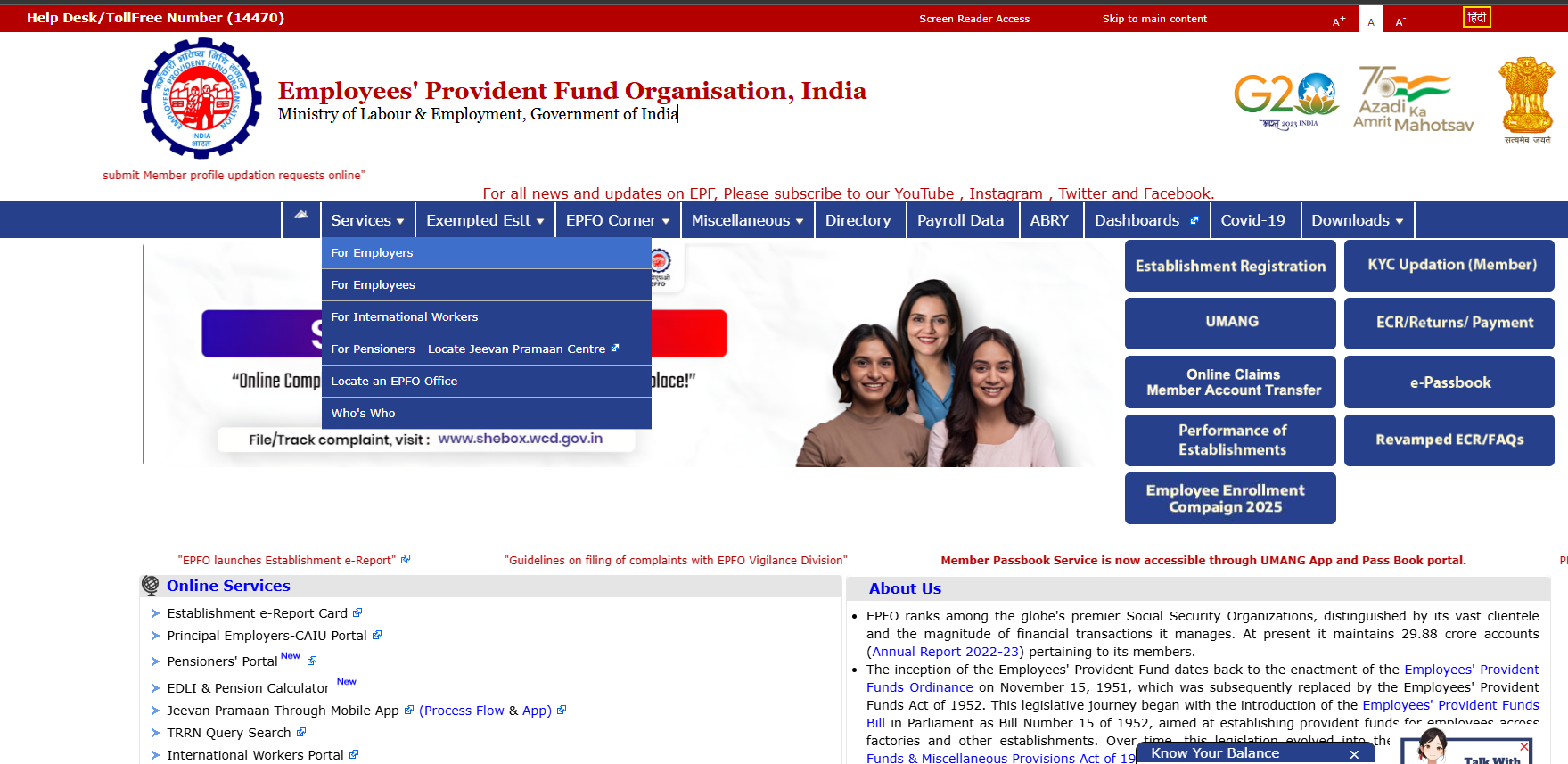
- You will see the “For Employers” option there. Click on it.
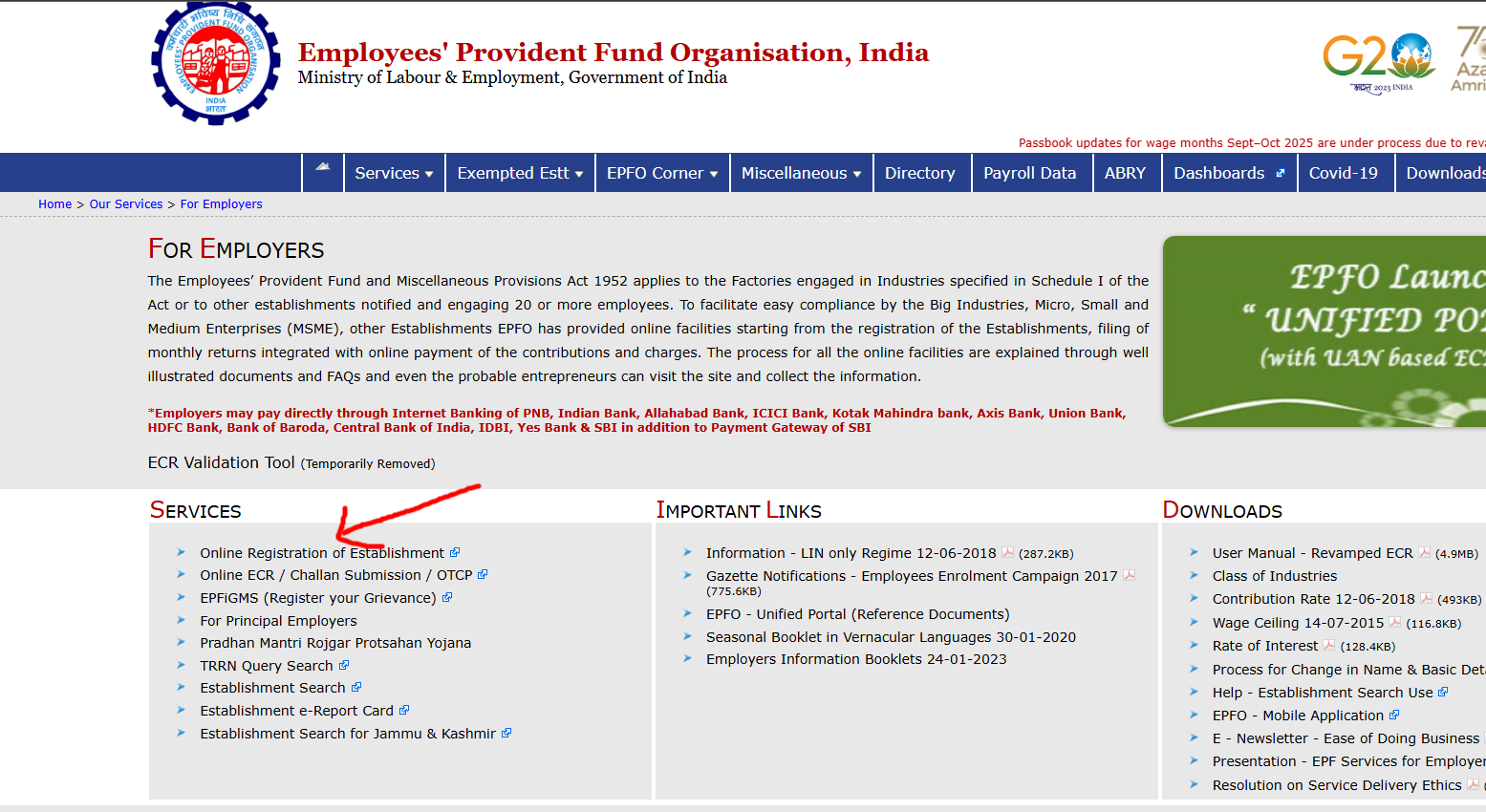
- A new page will open, where you will find the link “Establishment e-Sewa” or “Employer Portal.” Click on it.
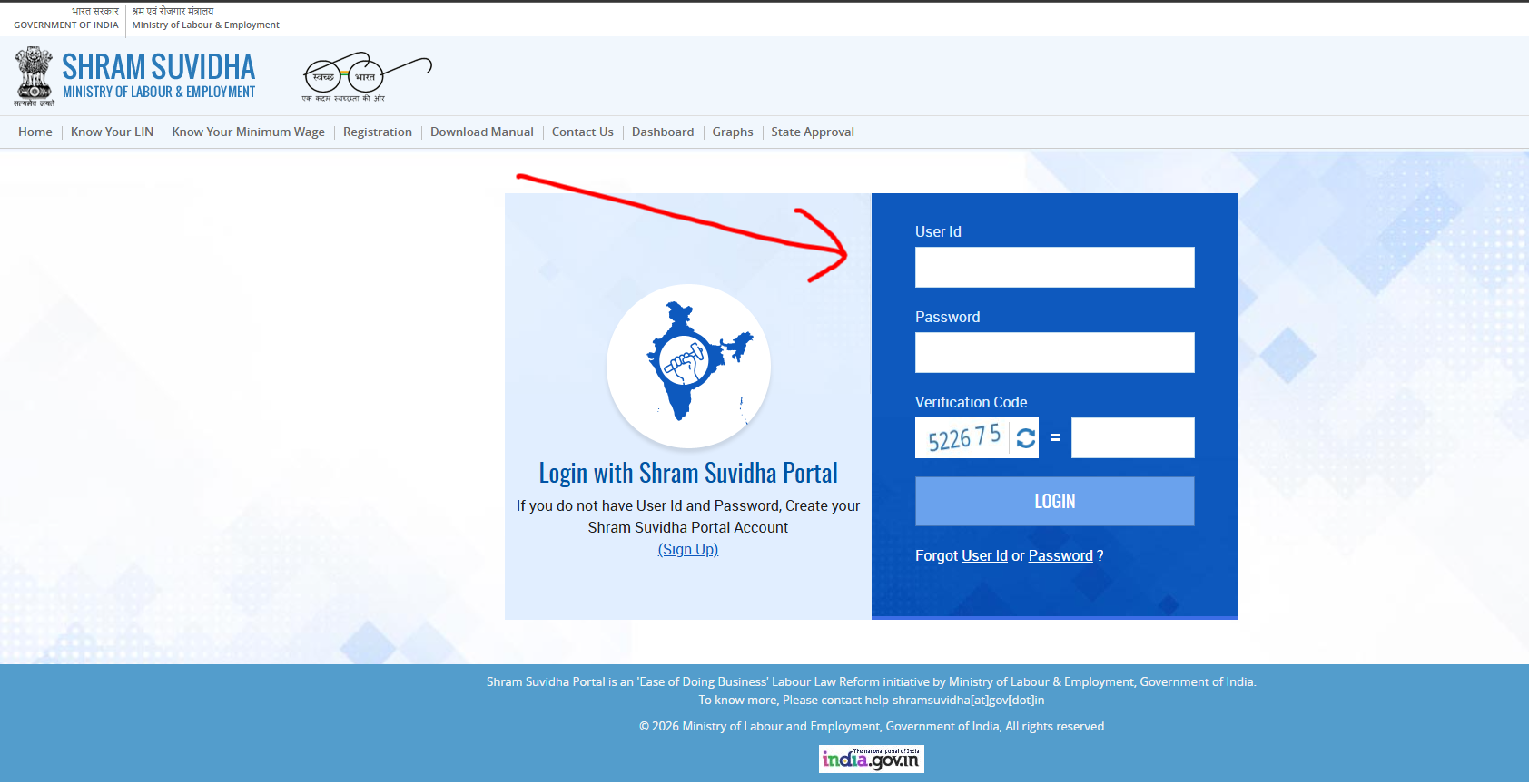
On the login page, enter the following details:
- Establishment ID: Your company’s establishment ID.
- Password: Your employer Epfo login password.
- Captcha: Enter the code shown on the screen.
- Click on the “Login” button. You will be redirected to the employer dashboard.
EPFO UAN Login: Why Your UAN Is Important
The Universal Account Number (UAN) is a unique 12-digit number issued to every member of the Employees’ Provident Fund Organisation (EPFO). Your UAN remains the same throughout your career, even if you change jobs. It links all your PF accounts and keeps your contribution records consolidated in one place.
The UAN login process is the same as the EPFO member login. You only need your UAN and password to access your account.
How to Activate Your UAN
If your UAN is not activated, you can activate it online through the EPFO portal.
You will need:
UAN number
Registered mobile number
Captcha code
Click on “Activate UAN”, enter the required details, and complete OTP verification to activate your account.
How to View and Download Your EPFO Passbook
The EPFO passbook shows a complete month-wise record of employee and employer PF contributions and interest.
Steps to view your EPFO passbook:
Log in using the EPFO member/UAN login.
On the dashboard, select “View Passbook (New)”.
Your full transaction history will be displayed.
Download the passbook in PDF format if required.
🔔 You can access the EPFO passbook only after a successful EPFO passbook login.
EPFO Member Login vs EPFO Employer Login
The Employees’ Provident Fund Organisation (EPFO) provides separate login portals for employees and employers, each designed for different purposes.
EPFO Member Login is for employees to check PF balance, view passbooks, update KYC details, and track claim status.
EPFO Employer Login is for organizations to manage employee PF contributions, file ECR, generate challans, and handle employee records.
Using the correct portal ensures faster access and avoids login errors.
How to Reset a Forgotten EPFO Login Password
If you forget your EPFO member login password, you can reset it online in a few minutes.
Steps to Reset EPFO Password
Visit the EPFO Member Login page.
Click on “Forgot Password” below the login button.
Enter the required details:
UAN number
Registered mobile number
Captcha code
Click “Get Authorization PIN”.
Enter the OTP sent to your registered mobile number and select “Validate OTP”.
Create and confirm a new password.
Once the password is reset successfully, you can log in to the EPFO portal using your new credentials.
Common EPFO Login Problems and Solutions
Users may sometimes face issues while accessing the Employees’ Provident Fund Organisation (EPFO) portal. Most problems can be resolved easily by following the correct steps.
| Problem | Solution |
|---|---|
| Invalid Credentials Error | Recheck your UAN, password, and captcha. Ensure Caps Lock is off. |
| OTP Not Received | Confirm your mobile number is linked with UAN and retry after some time. |
| Website Is Slow | EPFO servers may be busy; try logging in late at night or early morning. |
| KYC Not Approved | Contact your employer to approve and verify your KYC details. |
EPFO PF Withdrawal Process (2025)
If you are planning to withdraw your Provident Fund (PF) in 2025, the process is fully online and faster than before. Whether you have changed jobs or are planning retirement, submitting a PF claim online is the recommended method.
⚠️ Ensure your UAN, Aadhaar, PAN, and bank details are correctly linked before applying.
Documents Required for Online PF Claim
Before submitting your PF withdrawal request, keep the following details ready:
UAN (Universal Account Number)
Aadhaar card (linked with UAN)
PAN card
Bank account details (linked with EPFO)
Mobile number registered with UAN (for OTP verification)
Tip: You can confirm that your Aadhaar and bank details are correctly linked through the UAN Member Portal.
This step ensures that your claim is processed without delay or rejection.
How to Apply for PF Withdrawal Online (Step-by-Step)
Visit the EPFO Member Portal.
Log in using your UAN and password.
Go to Online Services → Claim (Form-31, 19, 10C).
Verify your bank account details.
Select the type of withdrawal:
Partial withdrawal (Advance)
Full withdrawal
Enter the required details and submit the claim online.
⏳ Processing Time: PF withdrawal usually takes 5–10 working days after successful submission.
UAN–Aadhaar Linking Before Claim
Before filing any PF claim, Aadhaar must be linked with your UAN.
Steps:
Log in to the UAN Member Portal.
Navigate to Manage → KYC.
Add Aadhaar and submit for verification.
Once approved by your employer, Aadhaar linking is complete.
How to Check EPFO PF Claim Status
After submitting a claim, you can track its status using either method:
Option 1: Through EPFO Member Portal
Log in to the portal
Go to Online Services → Track Claim Status
Option 2: Through UMANG App
- Open the UMANG app
- Select EPFO → Track Claim Status
- Enter your UAN
Partial vs Full PF Withdrawal
| Type | When Allowed | Purpose |
|---|---|---|
| Partial Withdrawal | While employed | Education, medical treatment, home loan, etc. |
| Full Withdrawal | After retirement or unemployment | Complete PF balance withdrawal |
📌 The maximum withdrawal amount depends on eligibility and EPFO rules.
Helpful Tips for Smooth PF Processing
Ensure KYC (Aadhaar, PAN, Bank) is verified
Use the official EPFO portal only
Keep your registered mobile number active
Track claim status regularly
Disclaimer: This article is for educational purposes only and does not constitute financial advice. For official information and updated rules, always visit the EPF india website.
EPFO Portal FAQs
What is EPFO UAN Login?
EPFO UAN Login allows employees to access their provident fund account online using their Universal Account Number (UAN) and password. It helps in checking PF balance, viewing the passbook, updating KYC details, and tracking claim status.
How do I activate my EPFO UAN?
To activate your EPFO UAN, visit the EPFO member portal and click on “Activate UAN”. Enter your UAN, registered mobile number, and captcha, then verify using the OTP sent to your mobile number.
What should I do if I forget my EPFO login password?
If you forget your EPFO login password, click on “Forgot Password” on the member login page. Enter your UAN, registered mobile number, and captcha, verify the OTP, and set a new password.
How can I view and download my EPFO passbook?
Log in to the EPFO member portal using your UAN and password. On the dashboard, select “View Passbook (New)” to see your transaction history and download the passbook in PDF format.
How can I apply for PF withdrawal online?
To apply for PF withdrawal online, log in to the EPFO member portal, go to Online Services, select Claim (Form-31, 19, 10C), verify bank details, choose the withdrawal type, and submit the claim.
How long does EPFO PF withdrawal take?
EPFO PF withdrawal generally takes 5 to 10 working days after successful claim submission, provided all KYC details are verified and approved.
How can I check my EPFO PF claim status?
You can check your EPFO PF claim status by logging into the EPFO member portal and selecting Track Claim Status, or by using the UMANG app with your UAN.